

When operating an MDF plywood sanding machine, encountering issues where it doesn't work properly can be a frustrating experience. As a supplier of MDF plywood sanding machines, I understand the importance of getting your equipment back up and running efficiently. In this blog post, I'll share some troubleshooting tips to help you diagnose and resolve common problems with MDF plywood sanding machines.
1. Check the Power Supply
The first step in troubleshooting any electrical equipment is to ensure it's receiving power. A lack of power can be the root cause of many issues.
- Verify the Power Cord: Inspect the power cord for any visible damage such as cuts, frays, or exposed wires. If you find any damage, replace the power cord immediately to avoid electrical hazards.
- Check the Outlet: Plug another device into the same outlet to confirm that it's functioning properly. If the other device doesn't work, the problem may be with the outlet. Try using a different outlet or contact an electrician to repair the faulty one.
- Inspect the Circuit Breaker: Check your electrical panel to see if the circuit breaker for the sanding machine has tripped. If it has, reset the breaker and try turning on the machine again. If the breaker trips repeatedly, there may be a more serious electrical issue with the machine that requires professional attention.
2. Examine the Belt
The sanding belt is a crucial component of the sanding machine, and problems with it can lead to poor sanding results or even machine failure.
- Look for Wear and Tear: Over time, the sanding belt can become worn out, which can affect its sanding performance. Check the belt for signs of excessive wear, such as a smooth surface or missing abrasive particles. If the belt is worn, replace it with a new one. Make sure to choose a belt with the appropriate grit size for your sanding needs.
- Check the Belt Tension: A loose or overly tight belt can cause the machine to vibrate, produce uneven sanding results, or even damage the belt. Refer to your machine's manual to find the correct belt tension settings and adjust the tension accordingly. You can usually adjust the tension using a tensioning mechanism on the machine.
- Inspect for Belt Tracking Issues: If the belt is not tracking properly on the machine's drums, it can cause uneven sanding and premature belt wear. Look for any signs of the belt veering to one side or rubbing against the edges of the drums. Some sanding machines have a tracking adjustment mechanism that allows you to align the belt correctly. Follow the instructions in your manual to make the necessary adjustments.
3. Evaluate the Dust Collection System
A properly functioning dust collection system is essential for maintaining the performance of your sanding machine and protecting your health.

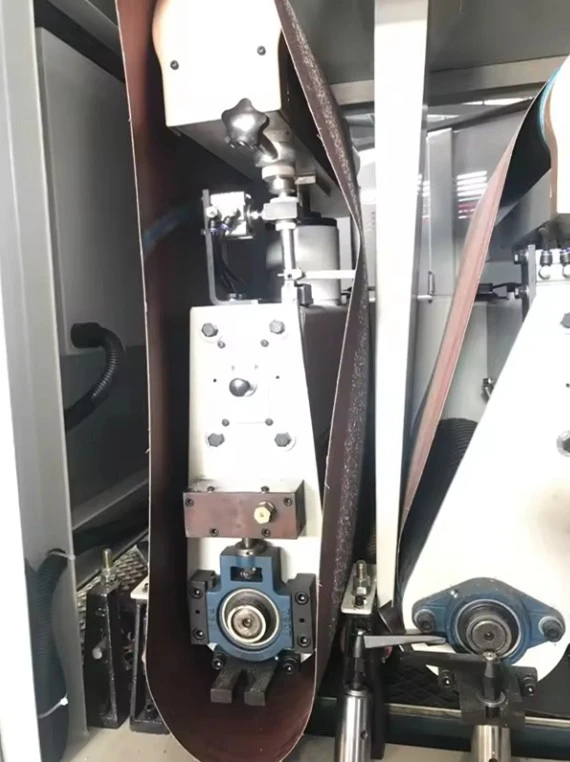
- Check the Dust Bag or Container: If your machine uses a dust bag or container, make sure it's not full. A full dust bag or container can restrict the airflow in the dust collection system, reducing its effectiveness. Empty the bag or container regularly to ensure optimal dust collection.
- Inspect the Dust Hose: Look for any blockages or kinks in the dust hose. A blocked or kinked hose can prevent dust from being effectively removed from the sanding area. Clear any blockages and straighten out any kinks to restore proper airflow.
- Test the Dust Collection Fan: Some dust collection systems have a fan that helps draw dust into the collection bag or container. Check if the fan is running properly. If it's not, there may be an issue with the fan motor or the electrical connections. You may need to consult a professional for further diagnosis and repair.
4. Assess the Machine's Alignment
Proper alignment of the sanding machine's components is crucial for achieving consistent and high - quality sanding results.
- Check the Drum Alignment: The drums on which the sanding belt runs should be parallel and properly aligned. Misaligned drums can cause the belt to wear unevenly and produce inconsistent sanding. Use a straightedge or a specialized alignment tool to check the alignment of the drums. If they are misaligned, follow the instructions in your machine's manual to make the necessary adjustments.
- Inspect the Table Alignment: The sanding table should be level and properly aligned with the sanding belt. An uneven or misaligned table can result in uneven sanding of your MDF plywood. Use a level to check the table's levelness and adjust the table feet if necessary.
5. Look for Mechanical Issues
There are several mechanical components in a sanding machine that can cause problems if they are not functioning properly.
- Check the Bearings: The bearings in the machine's drums and motors can wear out over time, causing excessive noise, vibration, and reduced performance. Listen for any unusual grinding or rattling noises coming from the machine, which may indicate bearing problems. If you suspect a bearing issue, it's best to have a professional replace the bearings.
- Inspect the Gears and Chains: If your sanding machine has gears or chains, check them for signs of wear, damage, or misalignment. Worn gears or chains can cause the machine to operate inefficiently or produce inconsistent sanding results. Replace any damaged or worn gears or chains as needed.
6. Software and Control System (for Automated Machines)
If you are using an automated MDF plywood sanding machine, the software and control system can sometimes be the source of problems.
- Check for Error Messages: Many automated sanding machines have a control panel that displays error messages when there is an issue. Read the error message carefully and refer to the machine's manual for troubleshooting instructions.
- Update the Software: Outdated software can cause glitches and performance issues. Check the manufacturer's website for any available software updates for your machine. Follow the instructions provided to install the updates.
Specific Machine Models
We offer a range of high - quality sanding machines, including the R - RP1000 Sanding Machine, the SYS - 60D Automatic Edge Sanding Machine, and the Sanding Machine For Wood. Each of these machines is designed with advanced features to ensure efficient and precise sanding. However, if you encounter any problems with these models, the troubleshooting steps mentioned above should still apply.
Conclusion
By following these troubleshooting steps, you can often identify and resolve common issues with your MDF plywood sanding machine. However, if you are unable to diagnose or fix the problem on your own, don't hesitate to contact us. As a trusted supplier of sanding machines, we have a team of experts who can provide you with professional advice and support. Whether you need assistance with troubleshooting, parts replacement, or general maintenance, we're here to help. If you're interested in purchasing a new sanding machine or have any questions about our products, feel free to reach out to us for a consultation. We look forward to helping you achieve the best sanding results for your MDF plywood projects.
References
- Manufacturer's manuals for MDF plywood sanding machines
- Industry best practices for sanding machine maintenance and troubleshooting


